


Sắp xếp "import" với Prettier

Việc import thiếu tổ chức khiến tôi vô cùng khó chịu khi thực hiện một dự án. Tôi thường muốn giữ toàn bộ cơ sở mã được tổ chức tốt nhất có thể vì nó giúp việc sàng lọc các tệp dễ dàng hơn nhiều. Với sự trợ giúp của prettier và một plugin, chúng ta có thể dễ dàng sắp xếp các import.
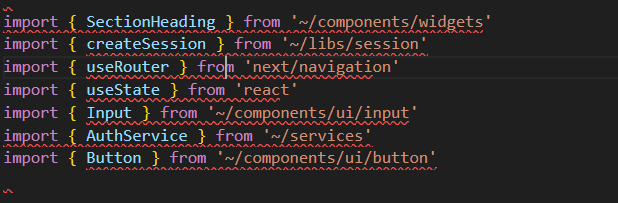
Đây là một file chưa được cấu hình sắp xếp import:
import { SectionHeading } from '~/components/widgets'import { createSession } from '~/libs/session'import { useRouter } from 'next/navigation'import { useState } from 'react'import { Input } from '~/components/ui/input'import { AuthService } from '~/services'import { Button } from '~/components/ui/button'Trong thực tế có thể trong 1 file sẽ có rất nhiều module được import, việc sắp xếp lại cái module import sẽ giúp code gọn gàng và dễ dàng tìm kiếm hơn.
Các bước thực hiện
Cài đặt package
npm install prettier @trivago/prettier-plugin-sort-imports --save-devChúng ta cài đặt package prettier và @trivago/prettier-plugin-sort-imports.
Tạo file .prettierrc.json
{
  "singleQuote": true,
  "semi": false,
  "tabWidth": 2,
  "trailingCommas": "es5",
  "printWidth": 120,
  "useTabs": false,
  "plugins": ["@trivago/prettier-plugin-sort-imports"],
  "importOrder": [
    "<THIRD_PARTY_MODULES>",
    "(~/components/)",
    "~/screens/",
    "~/contexts/",
    "~/hooks/",
    "~/models/",
    "~/libs/",
    "~/utils/",
    "~/services",
    "(.css)"
  ],
  "importOrderSeparation": true,
  "importOrderSortSpecifiers": true
}Có 4 config ta cần chú ý ở đây:
"plugins": Thêm quy tắc định dạng cho Prettier.
"importOrder": Đây là nơi cài đặt thứ tự import.
Ví dụ <THIRD_PARTY_MODULES> là các thư viện, (~/components/) là các module import bắt đầu bằng ~/components/, ... cho đến cuối là (.css).
Bạn cũng có thể tùy chỉnh theo dự án của riêng bạn.
"importOrderSeparation": true: Tự động thêm một dòng trống giữa các nhóm import khác nhau. Việc phân tách diễn ra theo importOrder.
"importOrderSortSpecifiers": true: Tự động sắp xếp các specifier (tên được import) trong dấu ngoặc nhọn {} theo thứ tự chữ cái.
Các config còn lại là config có sẵn trong thư viện prettier.
Sau khi config xong mỗi khi save + s trong vscode bạn thứ tự import đã được sắp xếp.
import { useRouter } from 'next/navigation'import { useState } from 'react'

import { Button } from '~/components/ui/button'import { Input } from '~/components/ui/input'import { SectionHeading } from '~/components/widgets'

import { createSession } from '~/libs/session'

import { AuthService } from '~/services'Nguồn bài viết
https://dev.to/diballesteros/how-to-quickly-sort-imports-with-prettier-3po7
